If your application crashes when traffic increases… you don’t have a scaling problem — you have a design problem.
That’s exactly where AWS Auto Scaling comes in.
In this guide, I’ll explain Auto Scaling in the simplest way possible and show you how it works with real traffic — just like in production.
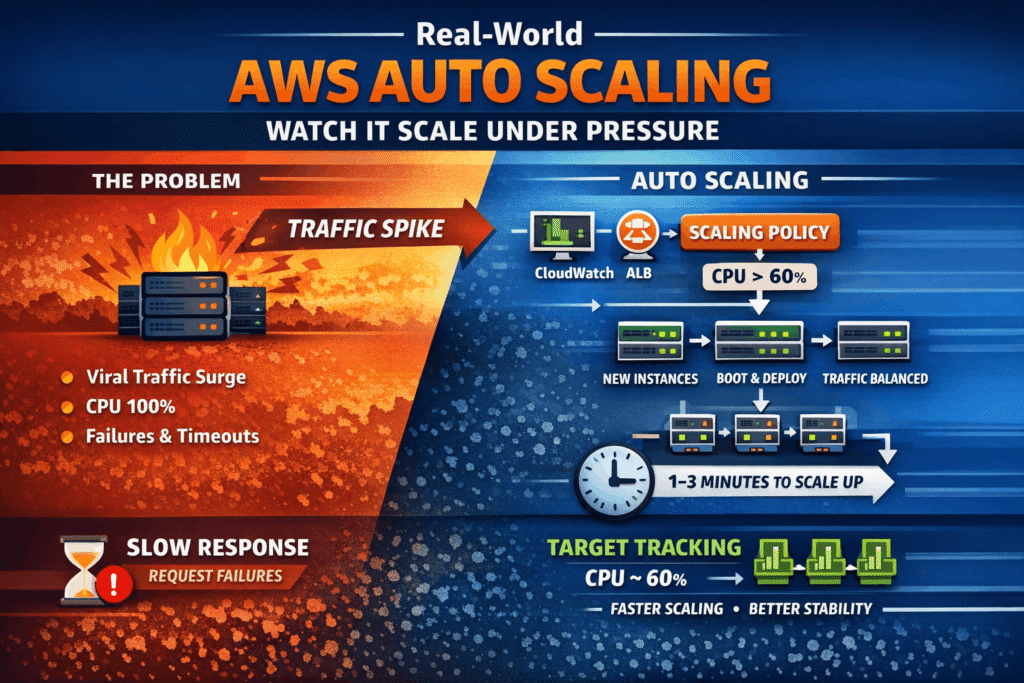
🔥 What is AWS Auto Scaling?
AWS Auto Scaling automatically adjusts the number of servers (EC2 instances) based on traffic.
👉 More traffic → More servers
👉 Less traffic → Fewer servers
This ensures:
- High availability
- Cost optimization
- Zero manual intervention
⚡ Real-World Example
Let’s say you built a website and deployed it on a single EC2 instance.
Now imagine:
- 10 users → works fine
- 1,000 users → server crashes
With Auto Scaling:
- AWS detects high CPU usage
- Automatically launches new EC2 instances
- Distributes traffic across servers
Result: Your app stays alive
🧠 Key Components of Auto Scaling
1. Launch Template
Defines how your EC2 instance should look:
- AMI
- Instance type
- Security groups
2. Auto Scaling Group (ASG)
This is the brain.
It decides:
- Minimum instances
- Maximum instances
- Desired capacity
3. Scaling Policies
There are 2 main types:
✔️ Target Tracking
→ Example: Maintain CPU at 50%
✔️ Step Scaling
→ Add instances when CPU crosses threshold
📊 How Scaling Works (Simple Flow)
- Traffic increases
- CPU utilization goes up
- CloudWatch triggers alarm
- Auto Scaling launches new instances
- Load Balancer distributes traffic
⚙️ Hands-On Architecture
Typical setup:
- EC2 instances
- Auto Scaling Group
- Application Load Balancer (ALB)
- CloudWatch monitoring
This is how real production systems work
🎥 Watch Full Practical Demo
I’ve shown this exact setup with real traffic in my YouTube video:
👉 (Embed your YouTube link here)
💡 Pro Tips (From Real Experience)
- Always set min = 2 instances (avoid downtime)
- Use health checks with ALB
- Don’t set max too high (cost control)
- Use cooldown period to avoid rapid scaling
🚀 Why This Matters
Auto Scaling is not just a feature…
It’s the difference between:
- ❌ App crash
- ✅ Production-ready system
If you’re preparing for DevOps or AWS interviews — this is a MUST-KNOW topic.
📌 Final Thoughts
Start simple:
- Launch 1 EC2
- Add Load Balancer
- Enable Auto Scaling
Then simulate traffic and watch the magic.
🔥 Want More?
I’m building a full AWS Zero to Hero series covering real-world projects.
👉 Follow along here: https://www.youtube.com/playlist?list=PLg_uqzorGE2VOQHks3D7fj1IcPFVvULq-
🏷️ Tags
AWS, Auto Scaling, DevOps, EC2, CloudWatch, Load Balancer, AWS Tutorial, DevOps Tutorial, AWS for Beginners